

Claude Dispatch Review 2026: Anthropic’s Remote AI Agent — Setup, Use Cases, Limits & Is It Worth It?
📑 Table of Contents
🎯 Quick Verdict
Claude Dispatch is Anthropic’s new remote AI agent feature — launched March 17, 2026 — that lets you assign tasks to Claude on your desktop from your phone, walk away, and return to finished work. It is the most practical implementation of always-on AI delegation available on any platform today, with important real-world caveats that every user needs to know before relying on it.
Every AI assistant launched in the last three years has shared the same fundamental limitation: it only works when you are sitting in front of it. You open the chat, describe what you need, wait for the response, and close the tab. The moment you step away, the work stops. The chatbot era is ending. Anthropic’s goal with Dispatch is to make Claude feel less like a tab you visit and more like a coworker you delegate to — persistent, long-running, and reachable when you’re nowhere near your laptop.
Claude Dispatch, launched as a research preview on March 17, 2026, is Anthropic’s answer to that limitation. It builds on Claude Cowork — the agentic desktop agent launched in January 2026 — by adding a phone-to-desktop control layer: you send a task from your phone, your desktop executes it locally, and you come back to finished work. According to Boris Cherny on X, Dispatch enables one persistent Claude conversation that runs locally on your computer and can be messaged from your phone. Thi s review covers everything you need to know — how it actually works, what it does well, where it falls short, and whether it is worth your time at the current stage of the research preview. For full context on where Dispatch fits within Anthropic’s broader product lineup, see our Claude plans comparison guide.
What Is Claude Dispatch?
Claude Dispatch is a new feature within Anthropic’s Claude Cowork environment that allows users to manage and monitor AI tasks running on their desktop computers directly from their smartphones. The capability, released as a research preview, enables a persistent conversation with Claude across devices, letting users assign work remotely and retrieve completed results at their convenience.
To understand Dispatch, you need to understand what it is built on. Cowork is a tab inside Claude Desktop that gives Claude an agentic workspace. You give it a task, it builds its own plan, works through it step by step, and sends you the result when it’s done. It can access your local files, use the MCP servers and connectors you’ve set up, and even work with tools like creating .pptx files or reading docs. It’s basically Claude Code’s agentic approach, but for general knowledge work — not just coding. Dis patch extends Cowork with one specific addition: while Cowork allowed the Claude desktop app to read and edit local files, it was strictly tethered to the physical machine. Dispatch breaks this limitation by acting as a remote control layer.
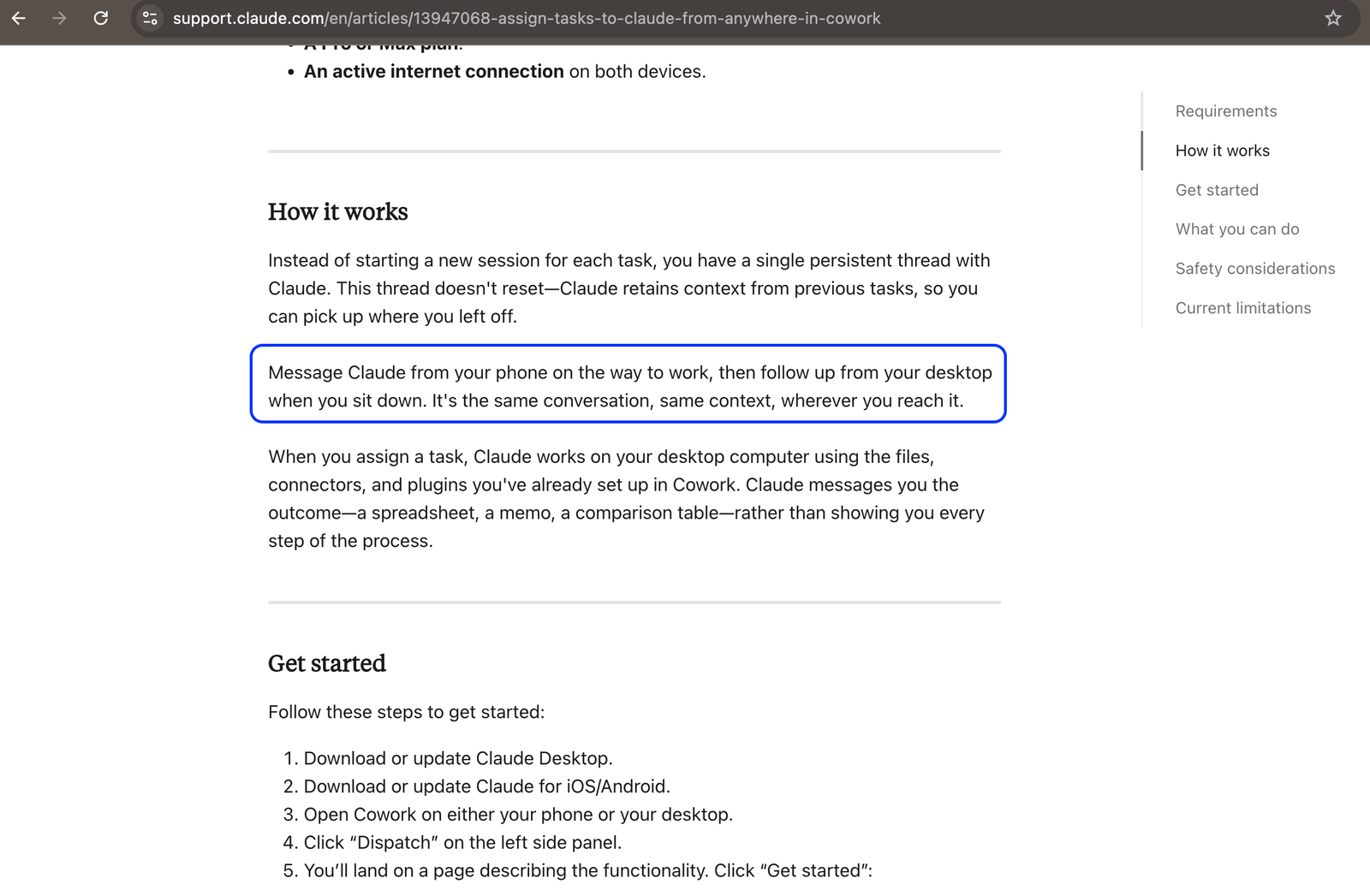
The mental model that makes Dispatch easiest to understand: regular Claude sessions are synchronous — you’re present, it responds, and the session ends when you close it. Claude Dispatch is an asynchronous task system. You assign a task from your phone, your desktop executes it locally, and you return to completed results. The conversation thread also persists across sessions, so Claude retains context from previous tasks. It’s closer to delegating work to a background process than having a back-and-forth conversation.
Multiple prominent AI researchers, from Simon Willison to Ethan Mollick, are comparing Dispatch favorably to OpenClaw — the AI agent standard that NVIDIA referenced at GTC 2026 when Jensen Huang said every company needs an OpenClaw strategy. Whe ther Dispatch delivers on that comparison in its current research preview state is the honest question this review addresses.
How It Works
The architecture of Claude Dispatch is deliberately simple — and that simplicity explains both its appeal and its current limitations.
Dispatch processes everything locally on your machine. Your files never leave your computer. Your data doesn’t route through external servers for processing. For anyone with compliance concerns or basic privacy preferences, that’s a meaningful design choice. Your phone sends text instructions. Your Mac does the work. Files stay on your machine. No third-party data transfer.
When you set up Dispatch, you’re telling Claude to stay ready on your desktop. The conversation itself syncs across your devices, but the actual work still runs locally on your machine. So your system needs to stay on and connected while a task is running. If your laptop goes to sleep midway, the task pauses until everything’s back online. Context persistence is one of the genuinely useful parts — you have a standard Claude session that forgets everything once you close it, and Dispatch keeps that context alive.
Dispatch incorporates strict human-in-the-loop controls. Even when controlled remotely, the agent will pause and send a push notification to your phone before performing destructive actions — like deleting files or moving large directories. The agent can only see and touch the specific folders or applications the user has explicitly shared with the Cowork app. The Dispatch bridge is end-to-end encrypted, ensuring that the command data traveling between your phone and your Mac remains private.
One developer who tested Dispatch in a real presentation-preparation scenario described the experience clearly: it opens a dedicated Cowork session, works through the task with a to-do list visible in the progress panel, completes each step one by one, and picks up the relevant skills when needed. Once Claude finished, the result showed up in the Cowork tab on the desktop app — and the same response showed up on the phone, ready to download and review right there. Tha t is Dispatch at its best — delegated, asynchronous, locally executed, and cross-device accessible.
Setup Guide
Setup takes under two minutes: download Claude Desktop, open Cowork, click Dispatch, scan a QR code with your phone. Done. Her e is the complete step-by-step:
✅ Claude Dispatch Setup — Step by Step
- Download Claude Desktop from claude.ai/download (macOS or Windows)
- Sign in with your Pro or Max plan account
- Open the Cowork tab inside Claude Desktop
- Click Dispatch in the Cowork sidebar
- A QR code appears on screen — scan it with the Claude iOS or Android app
- Your phone and desktop are now paired — one persistent conversation, two devices
- Enable Keep-Awake toggle in Dispatch settings — prevents your desktop sleeping mid-task
- Configure your connectors — Gmail, Slack, Google Drive, local folders — before sending your first task
The most important pre-setup step is configuring your connectors in Cowork before trying Dispatch. Set up Gmail, Slack, Google Drive, and other services ahead of time so they’re ready when you need them from your phone. Your computer going to sleep is the most common reason Dispatch tasks fail — enable the Keep-Awake toggle during setup.
On permissions: Dispatch can trigger any action Cowork has permission to perform, including reading, moving, and editing local files. Anthropic warns of prompt injection risks and advises granting access only to files and connectors you are comfortable with Claude acting on autonomously. Review your permission scope before using Dispatch on sensitive data. The sandboxed environment means Claude can only access what you have explicitly granted — but within that scope, it operates with full autonomy.
Key Features
Claude Dispatch is built on top of the full Claude Cowork feature set. The key features that make it distinct from standard Cowork sessions are the cross-device persistence, background execution, and the approval gate system.
Persistent Cross-Device Conversation Thread
Dispatch enables a persistent conversation with the Claude AI model that runs directly on users’ computers. Users can message Claude from their phones and return to completed work seamlessly, enhancing productivity across devices. Thi s persistence is architecturally different from standard Claude chat — the conversation thread persists across sessions, so Claude retains context from previous tasks. Con text files — markdown files that provide Claude with persistent knowledge about your projects, preferences, and file structure — are the recommended way to extend this memory further. Each task starts fresh without context files. Claude doesn’t remember what it did yesterday without them. Context files give Claude persistent knowledge, and scheduled tasks run the same instructions repeatedly.
38+ Connectors Including Gmail, Slack, Google Drive, and Microsoft 365
Cowork now supports 38+ connectors — Gmail, Drive, Microsoft 365, Slack, Notion, and more — plus a plugin marketplace and custom skills. Dis patch can leverage any connector configured in Cowork, making it possible to assign tasks that span multiple services in a single phone instruction. Ask it to summarize your Slack mentions, cross-reference with a Google Sheet, draft a response in Gmail, and save a report to Google Drive — all as one delegated task from your phone while commuting. Anthropic introduced the ability to create and schedule both recurring and on-demand tasks in Cowork, as well as a new Customize section in Claude Desktop that groups skills, plugins, and connectors in one place. Sch eduled recurring tasks are particularly powerful alongside Dispatch — you can configure a Monday morning briefing to run automatically before you wake up.
Human-in-the-Loop Approval Gates for Destructive Actions
Even when controlled remotely, the agent will pause and send a push notification to your phone before performing destructive actions like deleting files or moving large directories. Thi s approval gate system is Anthropic’s primary safety mechanism for remote execution — it prevents a vague instruction from accidentally deleting production files or overwriting work you meant to preserve. The practical implication: for read-only tasks like data retrieval, summarization, and report generation, Dispatch can run fully unattended. For tasks involving file modification, deletion, or large-scale reorganization, you will receive checkpoint prompts on your phone that require explicit confirmation before Claude proceeds. This is the right design choice for a research preview where the instruction interpretation is not yet 100% reliable.
Sandboxed Local Execution with End-to-End Encrypted Bridge
Dispatch processes everything locally on your machine. Your files never leave your computer. Your data doesn’t route through external servers for processing. The Dispatch bridge between your phone and desktop is end-to-end encrypted — command data traveling between your devices remains private. Thi s local execution architecture is what distinguishes Dispatch from cloud-based automation tools like Zapier or Make.com. Dispatch is not Zapier — Zapier handles structured app-to-app automation that runs always-on without your computer being active. Dispatch is a remote control for your local Claude Cowork session, not a cloud automation platform. For teams with data sovereignty requirements or compliance sensitivities, this local-first architecture is a meaningful advantage over any cloud-hosted automation alternative.
Scheduled Recurring Tasks
Users on Pro and Max plans can create and schedule both recurring and on-demand tasks in Cowork, accessible via Claude Desktop or Claude for iOS and Android. Sch eduled tasks combined with Dispatch create a genuinely new workflow pattern: configure a recurring briefing task to run every weekday morning at 7am — summarizing overnight Slack activity, flagging priority emails, and pulling any updated files from connected Google Drive folders — and it executes automatically on your desktop while you sleep. The results are waiting on your phone when you wake up. This combination of scheduling and remote access is what separates Dispatch from simply having a capable desktop AI agent — it makes that agent persistently productive rather than requiring you to initiate every session manually. For teams exploring how this fits into broader productivity automation, our AI productivity tools guide covers complementary platforms.
Best Use Cases
Based on Anthropic’s official documentation, developer reports, and the hands-on testing published in the first four days since launch, these are the use cases where Dispatch delivers its strongest real-world value.
Use Case 1: Morning Briefing on Your Commute
Problem: A knowledge worker spends the first 30 minutes of every morning manually checking email, scanning Slack, and pulling together a picture of what needs attention — time that could be reclaimed if the work happened automatically before they arrived.
Solution: Schedule a recurring Dispatch task for 6:30am: “Summarize all Slack mentions directed at me yesterday and flag any urgent unread emails.” Claude accesses connected Gmail and Slack connectors, pulls relevant data, organizes it by priority, and sends a concise summary to the mobile app.
Outcome: The briefing arrives to your phone before you leave the house — Gmail and Slack data retrieved, summarized, and flagged for priority — while you were getting ready for work. The commute becomes review time rather than catch-up time. This is one of the clearest demonstrations of Dispatch’s value — a routine daily task that requires no creative judgment, runs reliably on well-configured connectors, and saves 20–30 minutes every morning.
Use Case 2: Report Generation While Away From Your Desk
Problem: A data analyst needs to produce a formatted PowerPoint summary from monthly CSV files in their local Sales folder — work that takes 45 minutes of active attention to format, chart, and present correctly.
Solution: Send from phone: “Analyze the March CSV files in my Sales folder and create a PowerPoint summary with month-over-month comparison charts.” Claude accesses local files, processes the data, builds the presentation using the .pptx skill, and saves the result to the specified output folder.
Outcome: Claude opens a dedicated Cowork session, works through the task with a to-do list visible in the progress panel, completes each step one by one, and picks up relevant skills including the .pptx skill. Once finished, the generated .pptx file appears in the Cowork tab on the desktop app — and the same response shows up on the phone, ready to download and review. A 4 5-minute task completes while the analyst is in a meeting or out for lunch.
Use Case 3: File Organization and Folder Cleanup
Problem: A freelancer’s Downloads folder has accumulated six months of unsorted client files, receipts, and project assets that need organizing into a structured client-based folder system — work that is tedious, time-consuming, and easily delegated.
Solution: Send from phone: “Sort all PDF files from this month in my Downloads folder into subfolders organized by client name.” Claude reads the filenames, identifies client relationships, creates the folder structure, and moves files accordingly — with an approval gate notification before any file deletion.
Outcome: The Downloads folder is organized on return. The approval gate for any destructive actions provides a safety net for files Claude cannot confidently categorize, pausing for human confirmation rather than guessing. For professionals whose file management burden grows faster than their available time to address it, Dispatch turns a weekend chore into a background process.
Use Case 4: Spreadsheet Data Extraction and Summary
Problem: A sales manager needs Q4 revenue numbers extracted from a large Google Sheet connected through a desktop plugin, formatted into a summary for a board presentation.
Solution: Send from phone: “Extract Q4 revenue numbers from the Q4 Google Sheet and return a formatted summary.” Claude navigates the connector, finds the right sheet, parses the data, and returns a formatted summary to the mobile app.
Outcome: This task completed in about forty seconds — Claude navigated the connector, found the right sheet, parsed the data, and returned a formatted summary. This is Dispatch at its best — a straightforward data retrieval task with clear inputs and outputs. For managers who regularly pull data for presentations and reports, these 40-second tasks add up to meaningful time savings across a working week. For teams combining Dispatch with broader data workflows, our AI data analysis tools guide covers platforms that complement this kind of automated data retrieval.
Use Case 5: Presentation Preparation During a Meeting
Problem: A developer needs to prepare a conference talk presentation while simultaneously attending an unrelated meeting — two things that ordinarily cannot happen at the same time.
Solution: Before the meeting, grant Cowork access to the relevant preparation folder and template file. During the meeting, send from phone: “Read my previous event notes in the PrepFolder and create a PowerPoint outline using the template file, covering the AI Management Module features for ABP v10.2.”
Outcome: Stepping outside while heading to meet a friend, the developer dispatched the task from the phone. On return, the desktop showed a completed Cowork session with a generated .pptx file ready to download, complete with a full slide outline. The same response showed up on the phone. This is genuinely powerful — and if you pre-grant the relevant folder permissions, you don’t even need to approve anything on the desktop app. Two things happened simultaneously for the cost of a 30-second phone instruction.
Limitations and Honest Caveats
Claude Dispatch is a research preview launched four days ago. The limitations at this stage are real, specific, and worth understanding before incorporating it into any workflow where reliability matters.
⚠️ Current Limitations — Research Preview Status
- ~50% reliability on complex tasks — early bugs mean roughly half of complex multi-step tasks complete successfully at current state
- Desktop must stay awake — if your laptop sleeps or loses internet, the task pauses or stops entirely
- No completion notifications — no push alert when work finishes; you must check manually
- macOS and Windows only — Linux not supported; mobile is the controller, not the executor
- No memory between sessions without context files — each new session starts fresh unless you configure context files
- Not a Zapier replacement — cannot run always-on without active desktop; not suitable for 24/7 automation
- Cowork excluded from Audit Logs and Compliance API — not suitable for regulated enterprise environments yet
The no-notifications limitation is the one that most developers flag as the most frustrating in real use. You assign a task, walk away, and then you have to remember to check back. There is no push notification when the work finishes. No email. No sound. You open the mobile app and either see a completed result or a still-spinning task. Resorting to setting manual phone timers based on estimated task duration feels absurd for a 2026 AI product. Thi s is likely the first improvement Anthropic will ship — it is the gap between Dispatch feeling like a complete product and feeling like a promising beta.
The desktop-must-stay-awake constraint is architecturally by design rather than an oversight. Cowork’s “always on” nature is tied to your desktop environment. This raises operational questions for teams: device reliability — if the machine sleeps, reboots, or drops network, progress can pause. In early-preview form, this looks more like a per-machine workflow than a pooled, server-like runtime. The upside is control. The downside is that scaling “always-on” work usually wants a server-like model. Ant hropic’s choice to keep execution local is a principled privacy decision — but it trades the reliability of cloud execution for the data sovereignty of local processing.
On the reliability figure: Dispatch currently has a task success rate of around 50% due to early bugs. Dis patch is early — about 50/50 reliability — but it’s a start. Two independent sources converging on the same 50% figure for complex task completion is the most important single data point in this review. For simple, well-defined, data-retrieval tasks — the spreadsheet extraction and morning briefing use cases — reliability is meaningfully higher. The 50% figure applies to complex multi-step tasks with conditional logic or less precisely defined outputs.
Pricing and Availability
Claude Dispatch is included in existing Claude Pro and Max subscriptions — there is no additional charge for the feature itself.
| Plan | Price | Dispatch Access | Cowork Usage |
|---|---|---|---|
| Claude Free | $0/month | ❌ Not available | ❌ Not available |
| Claude Pro | $20/month ($17 annual) | ✅ Rolling out now | ✅ Standard limits |
| Claude Max 5x | $100/month | ✅ Available now | ✅ 25x Free usage |
| Claude Max 20x | $200/month | ✅ Available now | ✅ 100x Free usage |
| Claude Team | $25/seat/month | ✅ Available | ✅ Team limits |
| Claude Enterprise | Custom | ✅ Available | ✅ Enterprise limits |
The Dispatch feature is being rolled out in phases — available to Max plan users from March 17, and to Pro plan users from the following day. As of March 18, 2026, the official download page reads “Available on all paid plans for Windows and macOS” — not Max-only as some early coverage reported. The free tier has no access to Cowork or Dispatch — the feature requires at minimum a Pro subscription.
For context on whether Pro or Max is the right plan for your usage level — and how Dispatch fits within the full Cowork and Claude Code capability set — our Claude plans comparison guide covers every tier in detail. For most knowledge workers who will use Dispatch primarily for morning briefings, report generation, and file organization, Pro at $20/month is sufficient. The Max tier is justified only if you are consistently hitting Pro’s Cowork usage limits during intensive daily use.
Pros and Cons
✅ Pros
- Genuinely New Workflow Category: Dispatch increases throughput without demanding synchronized time. The ability to delegate work that runs while you are in a meeting, commuting, or sleeping is not an incremental improvement over existing AI tools — it is a qualitatively different mode of working with AI that no other mainstream product currently matches at this accessibility level.
- 2-Minute Setup via QR Code Pairing: Setup takes under two minutes: download Claude Desktop, open Cowork, click Dispatch, scan a QR code with your phone. Done. The friction-free pairing is one of the most well-executed aspects of the current research preview — a feature this architecturally complex launching with a 2-minute setup is genuinely impressive engineering.
- Full Local Data Privacy — Files Never Leave Your Machine: Dispatch processes everything locally. Your files never leave your computer. Your data doesn’t route through external servers. The Dispatch bridge is end-to-end encrypted. For professionals handling sensitive client data, this local-first architecture makes Dispatch viable for use cases where any cloud-hosted automation tool would be a compliance risk.
- 38+ Connectors Covering the Full Professional App Stack: Cowork supports 38+ connectors — Gmail, Drive, Microsoft 365, Slack, Notion, and more — plus a plugin marketplace and custom skills. The breadth of native integrations means most professionals can connect their full working environment without custom development or API configuration.
- Scheduled Recurring Tasks for Always-On Automation: The ability to create and schedule both recurring and on-demand tasks in Cowork tra nsforms Dispatch from a manual delegation tool into a configurable automation system — particularly powerful for daily briefings, weekly reports, and recurring file management tasks.
- Human-in-the-Loop Approval Gates Prevent Catastrophic Errors: The agent will pause and send a push notification to your phone before performing destructive actions. Thi s approval system is the right safety design for a research preview where instruction interpretation is not yet fully reliable — it allows unattended operation while maintaining human control at decision points that carry risk.
- Included in Existing Pro and Max Subscriptions: No additional cost. Existing Pro users at $20/month get access to Dispatch as part of their current plan — the value-to-cost ratio of the feature is high given that there is no incremental subscription charge.
❌ Cons
- ~50% Complex Task Reliability in Research Preview: Dispatch currently has a task success rate of around 50% due to early bugs. For complex multi-step tasks, this reliability floor means Dispatch cannot yet be trusted as a mission-critical automation tool without verification on return. Simple, well-defined data retrieval tasks perform better, but the published figure is an honest representation of current state.
- No Completion Notifications — Manual Checking Required: You assign a task, walk away, and have to remember to check back. There is no push notification when work finishes. No email. No sound. Thi s omission is the feature’s biggest practical frustration and the most cited complaint in early developer reviews — it makes the “come back to finished work” promise feel incomplete when you have no signal that the work is actually done.
- Desktop Must Stay Awake — Not True Cloud Automation: Close the lid, let the machine sleep, lose your internet connection — and Dispatch stops processing. The desktop is the compute engine. The phone is just the remote. Any workflow that requires genuinely always-on execution — overnight processing, tasks assigned while travelling without desktop access — is not yet reliably supported.
- No Memory Between Sessions Without Manual Context Files: Each task starts fresh. Claude doesn’t remember what it did yesterday. Bui lding and maintaining context files to provide persistent project knowledge is a workaround that adds setup overhead — it is not a substitute for the native session memory that most users would expect from a persistent agent.
- macOS and Windows Only — Linux Excluded: Right now, this feature only works on macOS and Windows. Linux users cannot use the desktop Cowork or Dispatch features. For the significant proportion of developers who run Linux as their primary development environment, Dispatch is unavailable regardless of subscription tier.
- Cowork Excluded from Audit Logs and Compliance API: Cowork activity is excluded from Audit Logs, Compliance API, and Data Exports. For enterprise teams where AI activity logging is required for security audits, legal compliance, or governance frameworks, this exclusion makes Dispatch unsuitable for regulated workflows until Anthropic adds compliance logging.
- Free Tier Unavailable — Minimum $20/Month Required: Dispatch requires at minimum a Claude Pro subscription. For students, hobbyists, and small business owners evaluating whether AI agent delegation is useful for their workflow, there is no free trial path — the evaluation requires a financial commitment before the value can be assessed.
Final Verdict
Claude Dispatch represents a major leap in AI evolution, moving from passive text generation to active, secure desktop automation. While early 2026 bugs and limitations hold it back from mass adoption, its ability to execute complex tasks locally from a mobile phone proves that true “digital coworkers” are finally becoming a reality.
The honest assessment for March 2026 is this: Dispatch is a genuinely compelling preview of a feature that will be excellent when the reliability reaches 80%+ and notifications ship. Dispatch isn’t the AI agent revolution. It’s the AI errand runner — and sometimes that’s exactly what you need. The revolution happens when they add notifications, multi-threading, and bump that success rate above eighty percent. Until then, it’s a two-minute setup that saves twenty minutes a day on tasks you shouldn’t be doing manually. Tha t framing from a developer who tested it hands-on is the most useful summary of the current state.
For Pro plan users ($20/month): enable Dispatch today, configure your connectors, set up context files for your primary projects, and start with the simplest possible tasks — morning briefings, spreadsheet data pulls, file searches. Build familiarity with what works reliably before assigning complex multi-step work. The 2-minute setup cost is zero, and even at 50% reliability on complex tasks, the tasks that do complete are genuinely time-saving. You lose nothing by starting now and calibrating your reliance on it as the reliability improves over the next few weeks.
For teams and enterprise users: treat Dispatch as a monitored pilot rather than production automation. Assign tasks with well-defined success criteria, verify outputs on return, and do not configure it with access to files or connectors where an error would create significant remediation work. Anthropic is training users to manage Claude like a task-running system, not a Q&A bot. That’s how you get from AI as a toy to AI as infrastructure. The transition to AI as infrastructure requires a reliability track record that Dispatch is four days into building. The trajectory is clear. The current state requires appropriate caution. For teams building their complete AI tooling ecosystem alongside Dispatch, our AI writing tools guide and AI productivity tools guide cover the complementary tools that complete a professional AI stack.
❓ Frequently Asked Questions
What is Claude Dispatch and how is it different from Cowork?
Claude Dispatch is a new feature within Anthropic’s Claude Cowork environment that allows users to manage and monitor AI tasks running on their desktop computers directly from their smartphones. While Cowork allowed the Claude desktop app to read and edit local files, it was strictly tethered to the physical machine. Dispatch breaks this limitation by acting as a remote control layer. Cow ork requires you to be at your desk. Dispatch lets you assign Cowork tasks from your phone and return to finished work later.
Which Claude plans include Dispatch access?
As of March 18, 2026, the official download page reads “Available on all paid plans for Windows and macOS.” Thi s means Claude Pro ($20/month), Max ($100–$200/month), Team ($25/seat/month), and Enterprise all include Dispatch. The free plan does not have access to Cowork or Dispatch.
Does my computer need to stay on for Dispatch to work?
Yes. Close the lid, let the machine sleep, or lose your internet connection — and Dispatch stops processing. The desktop is the compute engine. The phone is just the remote. If the engine shuts off, nothing happens. Ena ble the Keep-Awake toggle in Dispatch settings before assigning tasks, and ensure your desktop has a reliable internet connection for the duration of any long-running task.
Are my files and data safe when using Dispatch?
Yes — Dispatch processes everything locally on your machine. Your files never leave your computer. Your data doesn’t route through external servers for processing. The Dispatch bridge between your phone and desktop is end-to-end encrypted. Claude can only access the specific folders and connectors you have explicitly granted permission to in Cowork. Ant hropic also sends push notification approval gates before any destructive file actions.
How reliable is Claude Dispatch right now?
Dispatch is early — about 50/50 reliability on complex tasks — but it’s a start. Sim ple, well-defined tasks — data retrieval from connected services, file searches, structured summaries — complete reliably. Complex multi-step tasks with conditional logic or ambiguous outputs succeed roughly half the time in the current research preview state. Reliability is expected to improve significantly as Anthropic ships patches over the coming weeks. For production-critical workflows, verify outputs on return and start with simple tasks before escalating complexity.
Ready to Try Claude Dispatch?
Download Claude Desktop → Upgrade to Claude Pro →Claude Pro starts at $20/month — Dispatch included at no extra cost
Latest Articles
Browse our comprehensive AI tool reviews and productivity guides
Cursor Composer 2 vs Claude Opus 4.6 vs Sonnet 4.6 in 2026:...
Cursor Composer 2 vs Claude Opus 4.6 vs Sonnet 4.6 in 2026: Which Model Should You Use for Agentic Coding?
Cursor Composer 2 vs Claude Opus 4.6 vs Sonnet 4.6 — The smartest dev tools just leveled up. See which AI model actually codes, plans, and ships like a teammate—not just a chatbot.
Cursor vs Windsurf vs Claude Code in 2026: Which AI Coding Tool...
Cursor vs Windsurf vs Claude Code in 2026: Which AI Coding Tool Should You Use?
Cursor vs Windsurf vs Claude Code is the defining AI coding tool comparison of 2026 — three tools built on fundamentally different philosophies, targeting overlapping developer audiences at nearly identical price points, but delivering very different day-to-day experiences
Claude Dispatch Review 2026: Anthropic’s Remote AI Agent — Setup, Use Cases,...
Claude Dispatch Review 2026: Anthropic’s Remote AI Agent — Setup, Use Cases, Limits & Is It Worth It?
Claude Dispatch launched March 17, 2026 — send tasks from your phone, your desktop executes them locally, you come back to finished work. Setup takes 2 minutes. Current reliability is ~50% on complex tasks. Here is everything you need to know before relying on it.
Xiaomi MiMo-V2-Pro vs GPT-5.4 in 2026: China’s Stealth Trillion-Parameter Model Takes on...
Xiaomi MiMo-V2-Pro vs GPT-5.4 in 2026: China’s Stealth Trillion-Parameter Model Takes on OpenAI’s Flagship
A Xiaomi AI model appeared anonymously on OpenRouter on March 11, topped the usage charts, processed 1 trillion tokens, and beat GPT-5.4 on Terminal-Bench 2.0 (86.7% vs 75.1%) — before anyone knew who built it. Full breakdown inside.
GPT-5.4 vs Claude Opus 4.6 in 2026: Benchmarks, Pricing & Which Model...
GPT-5.4 vs Claude Opus 4.6 in 2026: Benchmarks, Pricing & Which Model Wins for Developers
Two flagship models, one month apart, trading benchmark leads across nine evaluations. GPT-5.4 is cheaper and broader. Claude Opus 4.6 writes better code and ranks #1 with real users. Here is exactly which one you should be using.
Cursor Composer 2 vs Claude Opus 4.6 in 2026: Benchmarks, Pricing &...
Cursor Composer 2 vs Claude Opus 4.6 in 2026: Benchmarks, Pricing & Which Is Better for Developers
Cursor Composer 2 launched March 19, 2026 — beats Claude Opus 4.6 on Terminal-Bench 2.0 (61.7% vs 58.0%) at one-tenth the token cost. Here is what that actually means for your workflow.
Claude Code vs OpenCode in 2026: Is the Free Open-Source Alternative Worth...
Claude Code vs OpenCode in 2026: Is the Free Open-Source Alternative Worth It for Developers?
Claude Code holds a 57.5% SWE-bench score and 4% of all public GitHub commits. OpenCode is free, open-source, and supports 75+ AI models. Here is the full comparison for 2026.
Claude Free vs Pro vs Cowork vs Claude Code 2026: Which Plan...
Claude Free vs Pro vs Cowork vs Claude Code 2026: Which Plan Is Right for You?
Claude Free, Pro, Max, Cowork, and Claude Code compared side by side — pricing from $0 to $200/month, real usage limits, and which plan delivers the best value for professionals in 2026.
The 7 Best AI Chatbots for Small Business Owners 2026: Free +...
The 7 Best AI Chatbots for Small Business Owners 2026: Free + Paid Solutions
Discover the 7 best AI chatbots for small business owners in 2026, offering both free and paid solutions to enhance customer engagement and operational efficiency.
Claude 3 vs ChatGPT 2026: The Ultimate Comparison with Pricing & Features
Claude 3 vs ChatGPT 2026: The Ultimate Comparison with Pricing & Features
Explore Claude 3 vs ChatGPT 2026 in this ultimate comparison of enterprise AI solutions, examining features, pricing, and performance for strategic business integration.
Top 5 AI Chatbots for Customer Service 2026: Boost Your Support with...
Top 5 AI Chatbots for Customer Service 2026: Boost Your Support with Smart Automation
Discover the top 5 AI chatbots for customer service in 2026, boosting support with smart automation, detailed features, and pricing.
The 6 Best Free AI Chatbots 2026: Powerful Tools Without the Price...
The 6 Best Free AI Chatbots 2026: Powerful Tools Without the Price Tag
The world of free AI chatbots in 2026 is evolving faster than ever, giving individuals, startups, and enterprises access to powerful conversational AI without the cost barrier. From customer support automation to lead generation